Admin
Admin
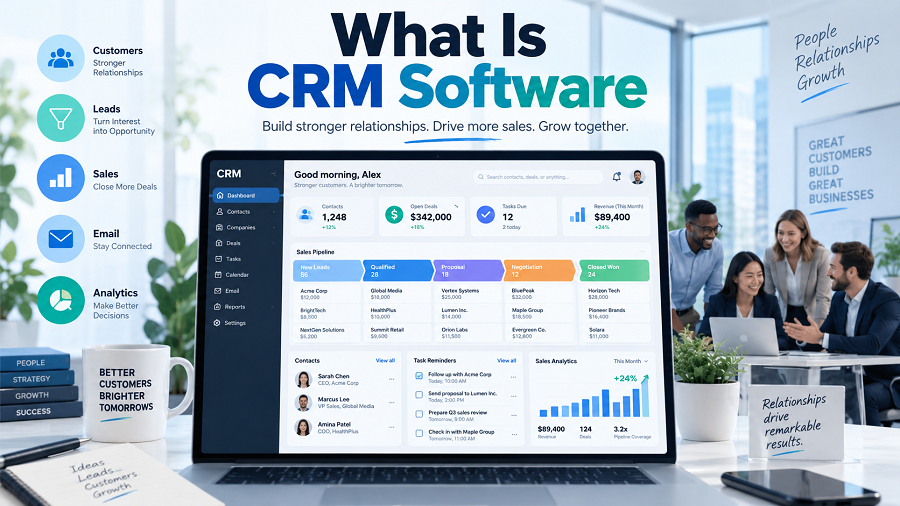
Every business depends on customers. Whether it is a small startup, an online store, a service company, or a large enterprise, managing customer relationships effectively is essential for growth.
However, as a business grows, customer information becomes harder to manage. Sales conversations may be stored in emails, contact details in spreadsheets, and follow-up tasks in personal notes.
This is where CRM software helps.
CRM software is a technology solution that helps businesses organize customer information, track interactions, manage sales opportunities, improve communication, and build stronger customer relationships.
The full form of CRM is Customer Relationship Management.
A CRM system serves as a central hub where businesses can store customer data and manage the entire customer journey — from the first contact to long-term loyalty.
What Does CRM Software Mean?
CRM software is a digital platform designed to help companies manage relationships with existing and potential customers.
Instead of keeping customer information in different places, a CRM consolidates important details into a single, organized system.
A CRM may store:
- Customer names
- Phone numbers
- Email addresses
- Company details
- Purchase history
- Sales conversations
- Support requests
- Meeting notes
- Follow-up reminders
For example, imagine a sales employee speaks with a potential customer today. Without a CRM, the employee may forget important details after a few weeks.
With CRM software, the conversation history, customer requirements, and next steps are recorded and available whenever needed.
How Does CRM Software Work?
CRM software works by collecting, organizing, and analyzing customer-related information.
The basic process includes:
Collecting Customer Data
Businesses collect information from different sources, such as:
- Website forms
- Emails
- Phone calls
- Social media
- Online purchases
- Customer inquiries
The CRM stores this information in customer profiles.
Organizing Customer Information
Instead of searching through multiple files, employees can view customer details from a single dashboard.
A customer profile may show:
- Contact information
- Previous conversations
- Current deals
- Purchase history
- Support tickets
Managing Sales Activities
Sales teams use CRM software to track potential customers through different stages.
A typical sales pipeline includes:
New lead
Contact made
Discussion
Proposal sent
Deal closed
This helps sales teams understand which opportunities need attention.
Automating Business Tasks
Many CRM systems can automate repetitive activities, such as:
- Sending follow-up emails
- Creating reminders
- Assigning leads
- Updating customer records
- Generating reports
Automation saves time and reduces manual work.
Why Do Businesses Use CRM Software?
Businesses use CRM software because customer management becomes difficult as the company grows.
Without a CRM system, businesses may face problems like:
- Lost customer information
- Missed follow-ups
- Poor communication between teams
- Difficulty tracking sales
- Limited understanding of customer behavior
A CRM solves these problems by creating a structured customer management process.
Key Features of CRM Software
Different CRM platforms offer different features, but most modern CRM systems include the following capabilities.
Contact Management
Contact management is the foundation of every CRM.
It allows businesses to store and organize customer information.
Examples:
- Customer names
- Email addresses
- Phone numbers
- Company information
- Communication history
This helps employees quickly find important customer details.
Lead Management
Lead management helps businesses track potential customers.
A CRM can show:
- Where a lead came from
- Current status
- Assigned salesperson
- Next action required
For example:
A website visitor fills out a contact form. The CRM automatically creates a new lead and assigns it to a sales representative.
Sales Pipeline Management
A sales pipeline provides a visual overview of sales opportunities.
Businesses can see:
| New Lead | Customer inquiry received |
| Qualified Lead | Customer interested |
| Proposal | Price shared |
| Negotiation | Terms discussed |
| Closed Deal | Purchase completed |
This helps sales teams prioritize important opportunities.
Customer Communication Tracking
CRM software records customer interactions.
It can track:
- Emails
- Calls
- Meetings
- Notes
- Messages
Employees can understand previous conversations before contacting customers.
Reporting and Analytics
CRM reports help businesses understand performance.
Common reports include:
- Sales performance
- Revenue tracking
- Lead conversion
- Customer activity
- Team productivity
These insights help managers make better decisions.
Marketing Automation
Some CRM platforms include marketing features.
These may include:
- Email campaigns
- Customer segmentation
- Lead nurturing
- Campaign tracking
Businesses can send more personalized communication to customers.
Customer Support Management
CRM software can also improve customer service.
Support teams can track:
- Customer complaints
- Service requests
- Previous solutions
- Response times
This helps businesses provide better customer experiences.
Types of CRM Software
CRM systems are usually divided into three main categories.
Operational CRM
Operational CRM focuses on daily business activities.
It helps manage:
- Sales
- Marketing
- Customer service
Example:
A company uses CRM software to automatically send follow-up emails after a customer inquiry.
Best For:
Businesses that want to improve daily customer operations.
Analytical CRM
Analytical CRM focuses on collecting and analyzing customer data.
It helps businesses understand:
- Customer behavior
- Buying patterns
- Sales trends
Example:
An online store analyzes customer purchases to recommend similar products.
Best For:
Businesses that rely on data-driven decisions.
Collaborative CRM
Collaborative CRM helps different departments share customer information.
For example:
- The sales team sees customer requirements.
- The support team sees previous complaints.
- The marketing team understands customer interests.
Best For:
Companies with multiple teams working together.
CRM Software Examples
Many CRM platforms are available for businesses of different sizes.
Popular CRM solutions include:
| HubSpot CRM | Startups and small businesses |
| Salesforce | Large enterprises |
| Zoho CRM | Small and medium businesses |
| Microsoft Dynamics 365 | Organizations using Microsoft tools |
| Freshsales | Sales-focused teams |
| Pipedrive | Sales pipeline management |
The right CRM depends on business size, budget, and requirements.
Benefits of CRM Software
Better Customer Relationships
CRM software helps businesses better understand customers.
Employees can access customer history and provide more personalized service.
Increased Sales Efficiency
Sales teams can manage leads, track deals, and follow up at the right time.
This reduces missed opportunities.
Improved Team Collaboration
A CRM creates a shared customer database.
Different departments can work with the same information.
Time Savings
Automation reduces repetitive tasks.
Employees spend more time building relationships instead of managing spreadsheets.
Better Decision Making
CRM reports provide insights into:
- Sales performance
- Customer trends
- Business opportunities
Managers can make decisions based on real information.
Improved Customer Experience
Customers receive faster responses because businesses have access to complete interaction history.
Who Needs CRM Software?
CRM software is useful for almost any business that manages customers.
Small Businesses
Small companies use CRM systems to organize customers and improve sales processes.
Examples:
- Local service providers
- Online sellers
- Consultants
- Agencies
Startups
Startups use CRM software to build organized customer management systems from the beginning.
Sales Teams
Sales professionals use CRM tools to manage leads and close deals.
E-commerce Businesses
Online stores use CRM systems to understand customer purchases and improve retention.
Large Companies
Enterprises use CRM platforms to manage thousands or millions of customer relationships.
CRM Software vs Traditional Spreadsheets
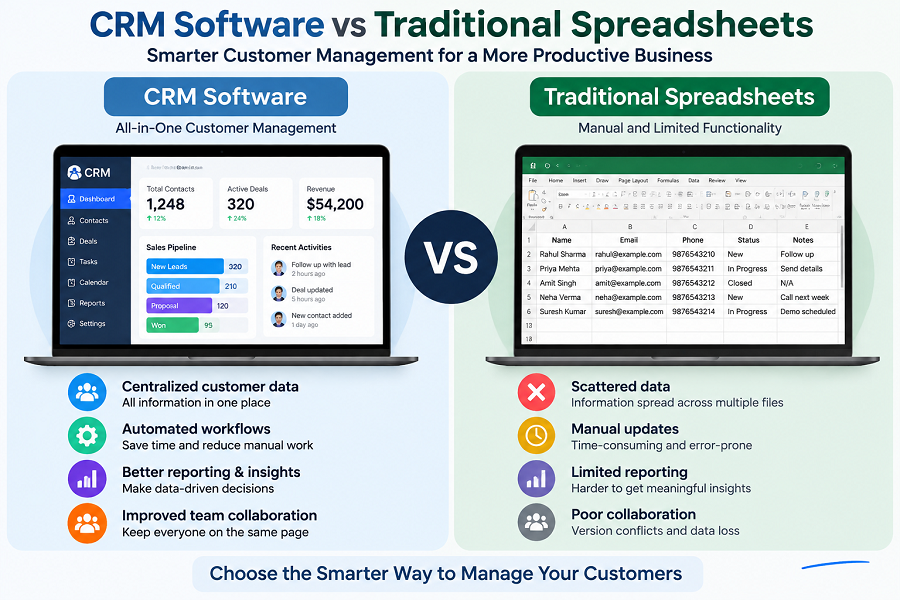
Many small businesses start with spreadsheets, but CRM systems provide more advanced capabilities.
| Customer database | Yes | Yes |
| Automation | Limited | Advanced |
| Sales pipeline | Manual | Built-in |
| Reports | Basic | Advanced |
| Team collaboration | Difficult | Easy |
| Customer history | Manual | Automatic |
Spreadsheets may work for very small operations, but CRM software becomes more valuable as customer numbers increase.
How to Choose the Right CRM Software
Before selecting CRM software, businesses should consider:
Business Size
A freelancer may need a simple CRM, while a large company may require advanced features.
Budget
CRM pricing varies widely.
Many providers offer:
- Free plans
- Monthly subscriptions
- Enterprise packages
Required Features
Businesses should identify important needs:
- Sales tracking
- Marketing automation
- Customer support
- Reporting
- Integrations
Ease of Use
A CRM should be simple enough that employees will actually use it.
A complex system with unused features may not provide value.
Is CRM Software Worth It?
For most businesses, CRM software is a valuable investment because customers are the foundation of growth.
A CRM system helps businesses:
- Stay organized
- Improve communication
- Increase sales efficiency
- Deliver better customer service.
The value comes from creating a consistent process for managing customer relationships.
Key Takeaways
- CRM software means Customer Relationship Management software.
- CRM systems help businesses manage customers, leads, sales, and communication.
- CRM software stores customer information in one central location.
- Businesses use CRM tools to improve sales and customer service.
- Operational, analytical, and collaborative CRM are the main types.
- CRM software is useful for startups, small businesses, and large companies.
Frequently Asked Questions (FAQs)
What is CRM software in simple words?
CRM software is a tool that helps businesses store customer information, manage sales activities, and improve customer relationships.
Why is CRM software important?
CRM software helps businesses organize customer data, track sales opportunities, improve communication, and provide better service.
Is CRM software only for large companies?
No. CRM software is useful for freelancers, startups, small businesses, and large organizations.
What are examples of CRM software?
Examples include HubSpot CRM, Salesforce, Zoho CRM, Microsoft Dynamics 365, Freshsales, and Pipedrive.
Can CRM software increase sales?
CRM software can help improve sales processes by organizing leads, tracking opportunities, and helping teams follow up effectively.